Launch your online school or train your team
Courses with lessons, video and quizzes, homework reviewed by a teacher and drip (staged) lesson release, certificates — on your own site. For online schools and for staff training. A Ukrainian alternative to the Russian GetCourse.
public course board
articles, videos, documents
knowledge assessment
progress under control
An online-school & training platform — everything it does
A ready-made LMS: a public course catalog, a course page with a test, homework reviewed by a teacher and drip (staged) lesson release — out of the box, with data on an EU server. Click any screen to take a closer look.
A public course catalog on your own website
Right after purchase the training center gets a course catalog under its own brand: titles, descriptions and ratings. No separate builder or developer needed — a learner enrolls themselves and studies at a convenient pace.
- Your logo, colors and courses
- Search and rating across the catalog
- Responsive on phone and tablet
Homework reviewed by a teacher
A learner submits their work (text + files) right from the cabinet, and the teacher grades it by hand: a score and written feedback, accept or return for rework. Plus drip (staged) access — a lesson opens N days after enrolment or only once the previous one is completed. This is exactly what GetCourse/Teachable charge for — included here, no Russian software.
- Text + file submission, manual review
- Score, feedback, “return for rework”
- Drip: on a schedule or after the previous lesson
A course page with checklists and a test
Lessons, completion checklists and a final test are gathered on one course page. The learner sees their progress, and the administrator sees who is at which stage and when they finished.
- Learner progress in real time
- A final test with scores
- A certificate after finishing the course
Flexible lesson content — text, video, files
Each lesson is built from text, video or files in a convenient order — no separate video host or third-party service. Onboarding material for a new employee is ready in an hour, not a week.
Learner reviews — social proof for new ones
After finishing a course the system invites the learner to leave a review with a rating. Approved reviews collect in the cabinet and strengthen the trust of new students — without collecting screenshots from messengers by hand.
- Review request automatically after a course
- Star rating and comment
- You publish only approved reviews
Ready to work on day one
Three things included in every plan at no extra cost. Here is how they work in this product.
Set up in 5 minutes, no manual needed
Fill in your center profile and courses with quizzes, graded homework and scheduled lesson unlocks are ready.
Answers clients and helps your team
Answers students' questions about the course, schedule and assignments. Your instructor doesn't have to field the same questions in chats.
Works out of the box on a free model with a daily limit. Connect your own model (Claude, ChatGPT, Gemini) at any time.
Your back office as an icon on the phone
The instructor opens the app from its icon: courses, students and assignments to review, from a phone, no laptop needed.
No App Store or Google Play: tap “Install” in the browser and your icon with your name appears on the screen.
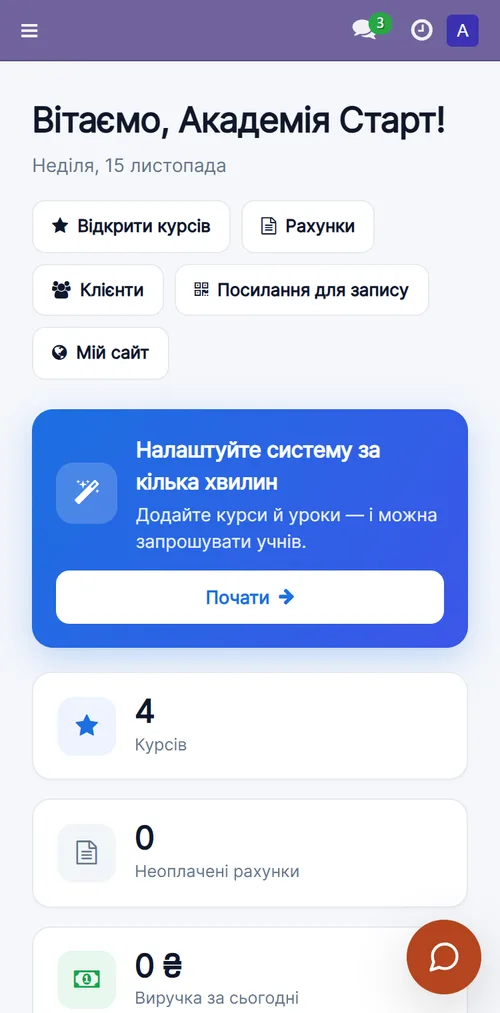
A system that works for your business
One simple plan
No hidden fees, no lock-in. Your data is yours, export anytime. Core updates arrive automatically.
- ✓ A public course board on the site
- ✓ Lessons, quizzes and a knowledge base
- ✓ 📝 Homework reviewed by a teacher
- ✓ ⏳ Drip (staged) lesson release
- ✓ A ready onboarding program
- ✓ Training service catalog, quotes and invoices
- ✓ Center website, consultation booking, cabinet
- ✓ Automatic deployment and updates
Frequently asked questions
How long does setup take?
A few minutes. After payment your system deploys automatically and credentials arrive by email.
How do learners enrol in courses?
Courses are published on the site under “Courses”; a learner enrols themselves and takes the lessons at their own pace.
Are there quizzes and certificates?
Yes: you can add scored quizzes to a course and, on completion, issue a certificate and see progress for everyone.
Is the data secure?
Each account is a separate, isolated database. Role-based access and a full activity log.
Try MCC for training today
14 days free. Then 690 ₴/mo, cancel anytime.